
Explore CalendarBudget Demo Video & Resources
Keeping track of expenses, savings, and goals can feel chaotic. The CalendarBudget app puts your budget right on your calendar so you can see when money moves and plan ahead with less guesswork. Below we’ll walk through how to use the app, highlight the features that help most, and share practical tips so you can take control of your money and hit your goals.
Features
The CalendarBudget app bundles practical tools that make budgeting simpler and more visual. Key features include:
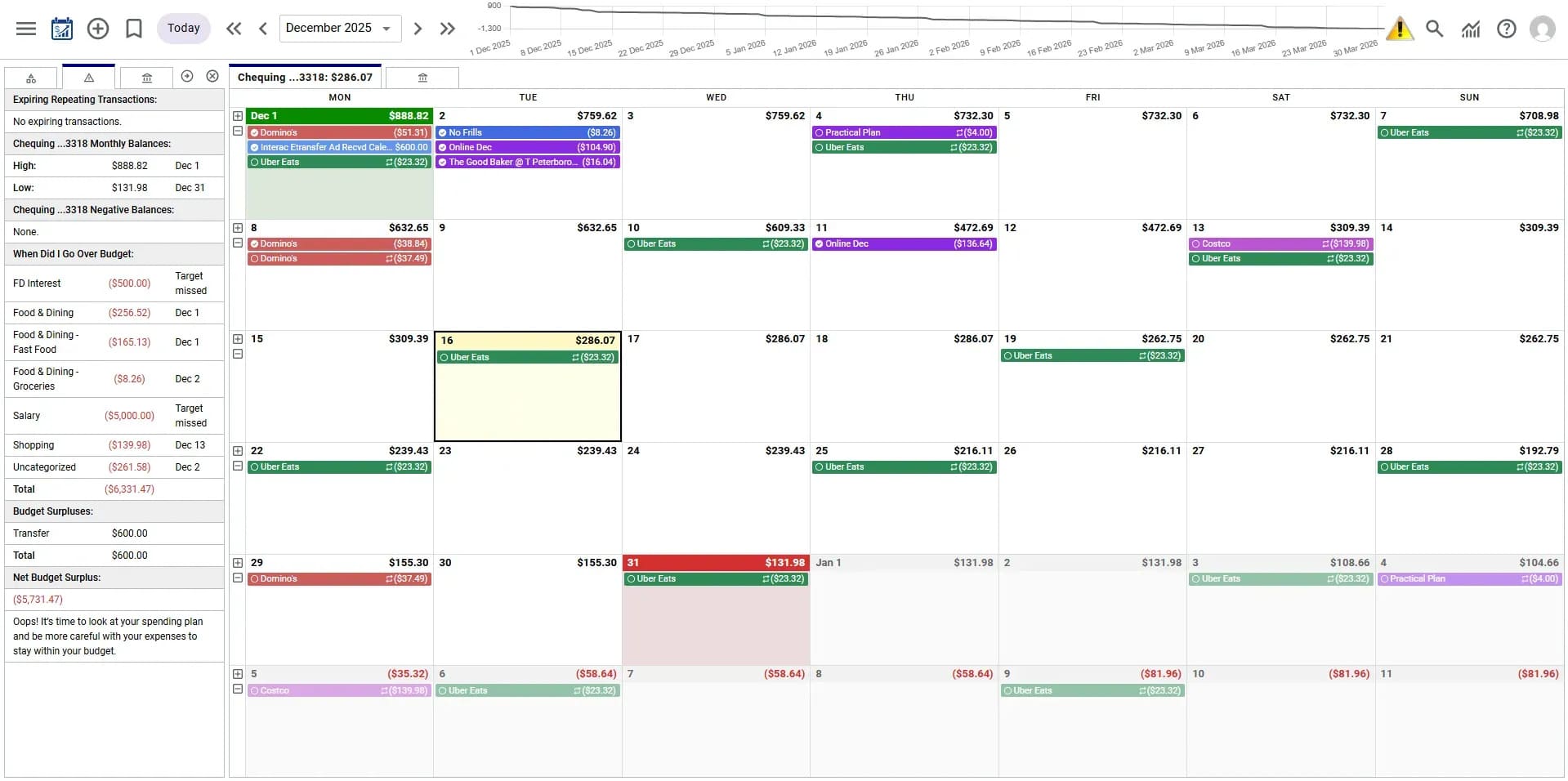
- Visual Budgeting Calendar: See bills, paydays, and spending laid out on a calendar so planning and timing feel intuitive.
- Expense Tracking: Log and categorize expenses quickly to get a clear picture of where your money goes.
- Customizable Budget Categories: Create categories that match your life so your budget fits you—not the other way around.
- Automated Reminders: Get alerts for upcoming bills and limits so you avoid surprises and late fees.
- Forecasting Tools: Project income and expenses to plan for big bills and upcoming months.
- Detailed Reports and Analytics: Generate reports that reveal spending patterns and help you make better decisions.
Together, these tools make CalendarBudget a practical choice for anyone who wants a clearer, calendar-first approach to managing money.
Benefits
Using CalendarBudget brings clearer habits and less financial friction. Here are the main advantages:
- Improved Financial Awareness: A calendar view helps you see the timing and impact of bills and income at a glance.
- Reduced Financial Stress: Reminders and tracking cut down on missed payments and the worry that comes with them.
- Enhanced Control Over Finances: Custom categories and detailed reports let you plan and adjust with confidence.
- Community Support: Connect with other users to swap tips and stay motivated as you work toward common goals.
For anyone serious about better money habits, the CalendarBudget app delivers tools and insights that make progress easier to measure and maintain.
Practical Tips for Users
Get the most from CalendarBudget with these straightforward steps:
- Start with a Free Trial: Try the app first to see how the calendar view fits your workflow.
- Input Financial Data Regularly: Update income and expenses often so your budget stays accurate.
- Set Financial Goals: Define short- and long-term targets to guide daily choices and keep you motivated.
- Engage with the Community: Learn from other users' strategies and share what's working for you.
- Utilize Tutorials: Follow the in-app guides to discover features you might otherwise miss.
These habits help you get faster, clearer results from the app and make budgeting a repeatable part of your routine.
What Is CalendarBudget and How Does It Simplify Personal Finance Management?
CalendarBudget is a personal budgeting app that puts budgets, bills, and paydays into a calendar layout. That simple shift makes it easier to visualize cash flow and plan around real dates. The app combines budget setup, expense tracking, and goal-setting into a single, easy-to-use platform so you can manage money without juggling spreadsheets.
Understanding CalendarBudget as a Budget Planner Software
As budget planner software, CalendarBudget helps you build and track budgets, set measurable goals, and watch progress over time. Visual reports and analytics reveal trends in your spending so you can make smarter choices. Optional bank integrations keep transactions up to date, minimizing manual entry and improving accuracy.
How to Use the CalendarBudget App: Step-by-Step Budget Calendar Tutorial
Getting started is straightforward. Follow these steps to set up and use the app:
- Getting Started: Download the app and create an account to begin.
- Setting Up Your Budget: Enter income and recurring expenses to establish a baseline.
- Utilizing Key Features: Explore categories, tracking, and reminders to match your needs.
- Monitoring Progress: Check your calendar and reports regularly to stay on track.
- Setting Financial Goals: Add targets—like an emergency fund or a vacation—and watch your progress.
- Engagement and Consistency: Use the app daily or weekly so your numbers stay current.
- Feedback and Adjustments: Use reports to tweak budgets and plan for upcoming changes.
These steps will help you use CalendarBudget to plan effectively and avoid surprises.
What Are the Benefits of Calendar-Based Budgeting with CalendarBudget?
Budgeting by calendar brings timing and context to your finances. Benefits include:
- Financial Planning: Visual calendars make it easier to spot when bills overlap or when cash flow is tight.
- Ease of Use: An intuitive calendar layout reduces friction and learning time.
- Enhanced Budget Management Features: Reminders and customizable categories streamline routine tasks.
- Maximizing Savings: Seeing spending patterns makes it easier to cut nonessential costs and boost savings.
- Community Support: Peer tips and shared experiences provide motivation and practical ideas.
These advantages show how CalendarBudget can make budgeting less abstract and more actionable.
How CalendarBudget Empowers Users to Manage Personal Finance
CalendarBudget equips you with clear visuals and practical tools so managing money becomes part of your daily routine. Customizable features and educational resources help you build better habits. Plus, community support offers encouragement and strategies from people facing similar challenges.
The app's mission lines up with research showing that digital tools can strengthen financial decision-making and increase people's financial confidence.
Digital Tools for Personal Finance Empowerment
As digital tools become part of everyday life, they increasingly shape how people manage money. This study explores how digital finance literacy affects financial behavior and stability, and highlights how technology can empower individuals financially.
Enhancing Personal Financial Decision-Making in the Digital Era: Awareness, Adoption, and Influence of Digital Personal Finance Tools, 2025
Which Features Make CalendarBudget One of the Best Online Budgeting Tools?
Several features help CalendarBudget stand out among online budgeting tools:
- Unique Functionalities: Combining a budget with a calendar view gives clearer timing and context for spending decisions.
- User Interface Advantages: A clean, intuitive design makes the app approachable for all experience levels.
- Integration Capabilities: Linking bank accounts for real-time updates reduces manual work and improves accuracy.
These elements work together to make CalendarBudget a practical, user-friendly option for managing personal finances.
Integration with Bank Accounts and Real-Time Tracking
CalendarBudget supports bank account connections so transactions can update automatically. Real-time tracking reduces manual entry and provides a clearer snapshot of your finances. You can link multiple accounts to get a full picture of income and expenses in one place.
User-Friendly Interface and Mobile Accessibility
The app is built for ease of use and mobile access, so you can check your budget on the go. A simple interface helps you find and use key features quickly, which research shows is essential for adoption and long-term use.
User Acceptance of Mobile Personal Finance Apps
This paper examines how ready people are to adopt mobile finance apps and which factors influence that decision. It highlights the role of usability and perceived value in encouraging ongoing use.
Mobile applications for personal finance management: Technology acceptance perspective, 2023
What Do Users Say About CalendarBudget? Testimonials and Success Stories

Users report that CalendarBudget helps them stay organized and aware of their spending. Many highlight the calendar layout as a game changer for timing bills and paydays, and they value the insights from reports that guide better choices.
How CalendarBudget Has Improved Financial Planning for Users
People using CalendarBudget say they've gained structure, set clearer goals, and tracked progress more reliably. The result for many is higher savings, fewer missed payments, and less financial stress—showing the app's practical impact on daily money management.
Where Can You Access the CalendarBudget Demo Video and Get Started Today?
You can watch the demo video and find interactive tutorials on the CalendarBudget website. These resources give a quick tour of the app and show how to use core features step by step.
Accessing the Demo Video and Interactive Tutorials
To find the demo and tutorials, follow these simple steps:
- Visit the CalendarBudget Homepage: Go to the official CalendarBudget website.
- Demo Video Availability: Look for the demo video section to watch an overview of the app's main features.
- Interactive Tutorials Access: Open the tutorials to learn how to use features in real scenarios.
These resources are a helpful starting point for new users learning the app.
Steps to Download and Begin Using CalendarBudget
Follow these steps to start using CalendarBudget:
- Sign Up: Create an account on the CalendarBudget website.
- Set Up Your Account: Enter your income and key expenses to build your initial budget.
- Customize Your Budget: Adjust categories and reminders so the app matches your priorities.
- Explore Features: Try reports, forecasts, and tracking tools to understand your cash flow.
- Utilize Resources: Use tutorials and community groups for tips and quick answers.
- Regular Updates: Keep your data current so your calendar and reports stay accurate.
Follow these steps to begin a simpler, more visual approach to budgeting with CalendarBudget.







Leave A Comment